How to Join My Blogroll & Use Blotanical
I’ve just updated to a new blogroll that tells me how recently you’ve posted on your blog. If you’d like to share reciprocal blogroll links with me, just let me know in the comments!
I’d also like to thank Stuart Robinson for creating Blotanical — it helped me find a lot of my favorite blogs. I’ve seen plenty of directories and networks, but Blotanical surpasses them with a more user-friendly and interactive design. If you’re interested in gardening blogs I highly recommend that you check it out.
In my opinion, the thing that sets Blotanical apart from other directories is the “Pick” feature. Stuart seems to have spent a lot of time trying to create a fair user voting system so that the cream of the gardening blogosphere rises to the top. Once you’ve joined Blotanical (and you don’t have to be a blogger to join) you can read blog posts from the feed on the “Picks” page. If you like a post, you can let other people know it’s good by voting it as many as 5 hearts. The picks page window also makes it easy to comment directly on the host blog if you like the post.
I spend a lot of time looking through the posts on the “New Blogs” page. This is a separate feed that highlights 200 of the newest blogs on Blotanical. I’ve found that a lot of these blogs are established and well-written even though they are new to the directory.
There is also a section for the “Most Faved Blogs.” Blotanical allows you to mark up to 48 blogs as your favorites (or you can choose your 48 favorite Blotanical members). Once you’ve chosen your favorites you can view their recent posts chronologically in a customized feed. In addition to this, the most popular “faved” blogs are listed for all Blotanical members, also with a feed list of their recent posts.
There are so many features on Blotanical that you may want to watch the video tutorial before you get started. Personally, I just started slow and expanded as I got more comfortable. I think I’ve learned more about blogging through using Blotanical than I have from any other blog tool.
Finally, I don’t really like to write non-illustrated posts and I’ve been dying for an excuse to use this weird photo from last December. It’s neat, but I couldn’t think of a “how-to” post to use it with. (“How to look at your yard through rose-colored sunlight?” or maybe “How to trick your kids into thinking that the aliens are coming”). At any rate, what you see is what was there. The sunset that day turned everything a strange, scarlet-pink.
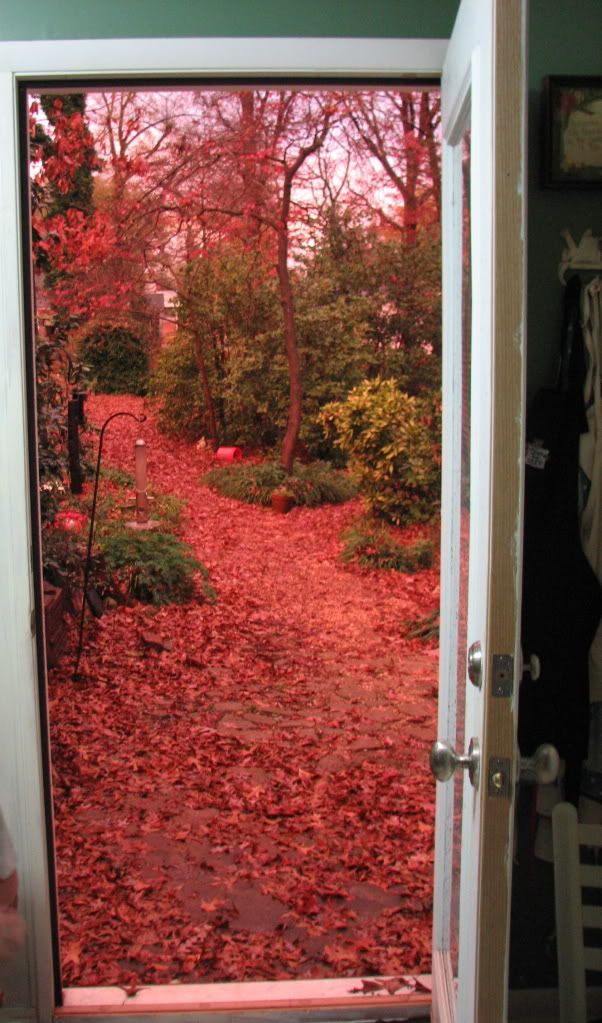
Photo Caption: It really looked like this in our backyard, no touch up on the photo!
I love it when nature has anomalies.


37 thoughts on “How to Join My Blogroll & Use Blotanical”
Comments are closed.
Carolflowerhill
Twitter: flora
- December 2, 2010 11:59 am
That is amazing light . . . was it about the hour of sunset? I am adding you to my blog roll. I love your site.
.-= Carolflowerhill´s last blog ..A Muse Day Carnival Hot- Loud and Proud =-.
Sustainahillbilly
Twitter: appalachianfeet
- December 3, 2010 9:37 am
It was about an hour before sunset, and it was also cloudy out. Thanks!
.-= Sustainahillbilly´s last blog ..How to Find Hedgehog Mushrooms and Eat Them- With Recipes =-.
Pam's English Garden - December 2, 2010 12:14 pm
Dear Eliza, Glad you found a reason to show this photograph … it is amazing! Pam x
.-= Pam’s English Garden´s last blog ..In Search of an Angel =-.
Curbstone Valley Farm - December 2, 2010 1:05 pm
The lighting is amazing in that shot Eliza!
.-= Curbstone Valley Farm´s last blog ..Arbutus menziesii =-.
Matron - December 2, 2010 1:11 pm
Could you paint me a lovely blue sky please? we are snowed in here in London at the moment!
Sustainahillbilly
Twitter: appalachianfeet
- December 3, 2010 9:37 am
That sounds terrible! I always feel for people with “real” snow (whereas my daughter is envious).
.-= Sustainahillbilly´s last blog ..How to Find Hedgehog Mushrooms and Eat Them- With Recipes =-.
Ali - December 2, 2010 3:15 pm
The colour is just beautiful, no wonder you thought the aliens were coming! Earlier this year on the east coast of Australia we had all this dust that had blown over from I can’t remember where, and it turned entire cities red like this… the effect was just incredible, and I was also thinking about aliens… I think we watch too much tv 🙂
.-= Ali´s last blog ..Onion Tales =-.
Sustainahillbilly
Twitter: appalachianfeet
- December 3, 2010 9:38 am
Haha! We had been watching a lot of Dr. Who recently…
.-= Sustainahillbilly´s last blog ..How to Find Hedgehog Mushrooms and Eat Them- With Recipes =-.
Jen R. (emeraldsunshine.org) - December 2, 2010 3:30 pm
Neat link – thanks! That’s definitely an interesting color.
.-= Jen R. (emeraldsunshine.org)´s last blog ..Sound Bite of a Nate-inator =-.
luvarugula - December 2, 2010 4:12 pm
Eerie! Almost like a portal to another world.
.-= luvarugula´s last blog ..Notable posts =-.
Donna - December 2, 2010 6:02 pm
The lighting in your shot is wonderful You had to capture it at just the right moment. I like your blogroll listing posts, I would like to have this also. I use WordPress and if you would be kind enough to fill me in on the how-to I would appreciate it.
Sustainahillbilly
Twitter: appalachianfeet
- December 2, 2010 6:39 pm
It’s a plugin called “WP Social Blogroll” for the download version of WordPress. I had to mess around with it for a bit but I finally got it to work (I’m probably not the best person to explain it to someone else, though).
.-= Sustainahillbilly´s last blog ..How to Join My Blogroll & Use Blotanical =-.
Michelle - December 2, 2010 7:53 pm
That is absolutely BEAUTIFUL!!!
Thanks for paying a visit to my blog. I will definitely be back to yours! 🙂
Michelle
Donna - December 2, 2010 8:29 pm
Thank you. I will give it a try. Not sure if my theme (twenty ten) will allow it.
.-= Donna´s last blog ..Tag-Along Thursday- My Tree Comes Home =-.
One - December 2, 2010 11:12 pm
Lovely RED garden you have there. Do you know you have been on my blogroll?
.-= One´s last blog ..Citrus Butterfly =-.
Sustainahillbilly
Twitter: appalachianfeet
- December 3, 2010 9:41 am
I didn’t know, but I’ve just added you to mine! (Also, is there some consolidated way for me to tell when people link to me?)
Thanks!
.-= Sustainahillbilly´s last blog ..How to Find Hedgehog Mushrooms and Eat Them- With Recipes =-.
PatioPatch
Twitter: LauraBloomsbury
- December 3, 2010 7:51 am
thank you for this – saw it headlined on WP and wondered how well it worked. Brilliant – like your scarlet garden shot
Laura
.-= PatioPatch´s last blog ..St Andrew’s Gardens =-.
Sustainahillbilly
Twitter: appalachianfeet
- December 3, 2010 9:42 am
I’m pretty happy with it, plus you can choose whether or not to use people’s favicons. I would have thought I’d prefer it with pictures but then I saw it used that way and realized I just find it overwhelming. I seem more likely to read and respond to blogrolls without them.
.-= Sustainahillbilly´s last blog ..How to Find Hedgehog Mushrooms and Eat Them- With Recipes =-.
Tatyana - December 3, 2010 8:28 am
Incredible! Another world…
Sustainahillbilly
Twitter: appalachianfeet
- December 14, 2010 6:03 pm
🙂
Sue Langley
Twitter: suewylan
- December 3, 2010 12:52 pm
Love this, Eliza, I don’t see why you can’t just post a photo without an excuse! 😀
.-= Sue Langley´s last blog ..Past memories and changing your mind =-.
Sustainahillbilly
Twitter: appalachianfeet
- December 14, 2010 6:00 pm
Haha! That’s what I get for trying to create a strictly themed blog.
.-= Sustainahillbilly´s last blog ..How to Grow and Use Achocha-Caigua a Problem-Free Cucumber Substitute- with Recipes =-.
Elephant's Eye - December 3, 2010 2:14 pm
Will your blogroll widget let you put in the title of the post (as Commentluv does here)? I had my blogroll without photos, loads faster, but I find myself guilty of clicking on blogroll links WITH pictures. So I added pictures. I broke my list down into 3, latest 5 on each list.
Oh and if you tell Stuart you get a red star for mentioning Blotanical!
.-= Elephant’s Eye´s last blog ..Journey from Montagu to George =-.
Sustainahillbilly
Twitter: appalachianfeet
- December 14, 2010 5:58 pm
It does let me put in blog titles, but I wasn’t sure how crowded that would look. Thanks for letting me know about the star!
.-= Sustainahillbilly´s last blog ..How to Grow and Use Achocha-Caigua a Problem-Free Cucumber Substitute- with Recipes =-.
Gail - December 4, 2010 7:13 am
That’s a great view out the door! I ove Autumn’s light~gail
Sustainahillbilly
Twitter: appalachianfeet
- December 14, 2010 5:56 pm
Thanks!
.-= Sustainahillbilly´s last blog ..How to Grow and Use Achocha-Caigua a Problem-Free Cucumber Substitute- with Recipes =-.
Robert - December 8, 2010 1:49 am
What an amazing photograph. I can’t help but mention that it reminds me of a T. Coraghessan Boyle short story entitled “Bloodfall”. It’s about a group of individuals who become trapped in a cabin during a torrential rainfall. Except it’s not raining water, instead it’s blood. And no, it is not a horror story. It’s actually uh… funny. Great post.
Sustainahillbilly
Twitter: appalachianfeet
- December 14, 2010 5:53 pm
I’ll take your word for it… or maybe I’ll get my boyfriend to read it first. He’s a pretty accurate censor for what I’ll like. 🙂
.-= Sustainahillbilly´s last blog ..How to Grow and Use Achocha-Caigua a Problem-Free Cucumber Substitute- with Recipes =-.
LynnS - December 10, 2010 7:06 am
I’ve been reading you via Google-Reader for months. I’d love to swap links, in fact, in January, I’m adding an Appalachian section to my blog and will be reaching into my family history. My Appalachian roots track back to the 1700s on all sides of my family.
Since you are with WordPress and asked about the ability to check incoming links, go to your Admin section, lower right side of the main page.
Sustainahillbilly
Twitter: appalachianfeet
- December 14, 2010 5:52 pm
Thanks for the info! I’ve added you to my blogroll. It’s great that you can trace your genealogy so well. It sounds like we have similar roots (I wish I’d picked up your quilting skills along my journey, though). 🙂
.-= Sustainahillbilly´s last blog ..How to Grow and Use Achocha-Caigua a Problem-Free Cucumber Substitute- with Recipes =-.
Rebecca Nickols - December 17, 2010 3:16 am
I just joined the blog-world and I came across your blog when I did a “google search” about Blotanical! Glad I’m here-I’ll be visiting your site often 🙂
.-= Rebecca Nickols´s last blog ..Christmas gifts this year-Its all about the birds and the bees =-.
Sustainahillbilly
Twitter: appalachianfeet
- December 30, 2010 4:04 pm
Glad you found me — and Blotanical, too!
.-= Sustainahillbilly´s last blog ..How to Use Snow to Locate Microclimates & HtFGP Deadline =-.
fer
Twitter: mygardeninjapan
- December 17, 2010 6:38 am
That is an amazing photo!
.-= fer´s last blog ..Coldframe V20 =-.
Corner Garden Sue - December 19, 2010 9:03 pm
I have met lots of garden bloggers on blotanical. I’m finding myself so busy, and have so many blogs I am now trying to keep up with, that I don’t go to blotanical as often as I used to. When I meet new people with great blogs like yours, I add them to my huge blogroll. I’m about to go do that now. I like your post on lemon grass. I’ve read some about that food bill. I’m thinking it passed. I’m not sure what the details are, but we need the local food growers to be able to stay in business.
.-= Corner Garden Sue´s last blog ..Foliage Follow-up =-.
Sustainahillbilly
Twitter: appalachianfeet
- December 30, 2010 4:04 pm
Me too! I think I’m finally getting the hang of most of the features (I was a low learner). I’ve added you to my blogroll, love your bird feeding photos!
.-= Sustainahillbilly´s last blog ..How to Use Snow to Locate Microclimates & HtFGP Deadline =-.
Lisa - December 31, 2010 10:50 am
There are so many wonderful blogs out there. I used to spend more time on Blotanical — it IS an excellent site. I like Nature Blog Network, too — I tend to check in there much more frequently.
Hope you see a bit of snow here in the mountains — enjoy!
.-= Lisa´s last blog ..Ordering seeds and seed catalogs =-.
Lisa - December 31, 2010 10:52 am
There are so many great blogs out there. I’ve enjoyed Blotanical, too, although I haven’t been recently using it. I like to check in periodically at Nature Blog Network — the organizers there seem like a good group, too.
Hope you’re able to enjoy some snow in the mountains!
.-= Lisa´s last blog ..Ordering seeds and seed catalogs =-.